- May 19, 2026
20 Writing Mistakes to Avoid When Working From Home
- September 15, 2026
- in Success
This work-from-home economy brings most of our business communication through email. With that comes bad habits, as it's easy to write poorly when you're not in an office setting.
From unclear emails to spelling and punctuation errors, there are several writing mistakes when working from home that can affect your professional communication. So, we thought we'd give you a list of possible writing missteps you may encounter and simple ways to avoid them.
Common Writing Mistakes to Avoid When Working From Home
Here is a quick look at common writing mistakes to avoid when working from home. Learn how to write clearer emails, avoid grammar errors, and communicate more professionally.
Keep it brief
There is a saying by Kurt Vonnegut that says, "Every sentence must have an ax to grind against the story action." Needless to say, he wasn't referring to Business Writing at the time, but it is equally true. Your sentences should mean something or they do not deserve a place in an email. In essence, always think of your reader who also probably gets several emails a day. And always be concise, as much as possible.
Read More: Difference Between Success and Achievement Explained
But not too brief
As with writing brief texts, it's not in your best interests to write a one-liner of an e-mail. If someone takes their precious time to write an elaborate mail for information and requests it from you and all you send back is one sentence in return (especially since most likely it'll result in questions that need further clarification), keep in mind e-mails aren't like text messaging to and from.
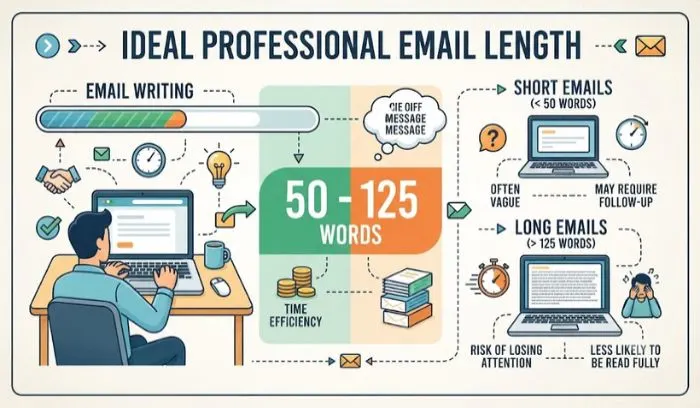
Hub Spot reports that the ideal length of a message is between 50 and 125 words. At this range, your message has over 50% chance of being responded to.
Be patient when waiting for replies
Without an extremely urgent reason that you'll probably be able to resolve much faster by picking up the phone anyway, avoid using "IMPORTANT!!!" in the subject box of your emails or requests for someone to "reply immediately."
The more you resort to them, the lower your priorities are likely to fall on the receiver's list. Have some patience-you're not the only one working from home.
Don’t leave others waiting too long
Just as you aren't too happy to get a reply to your email after two full days, others don't want to be made to wait either. Richard Moran (a venture capitalist) says that if you want to hold on to the dreaded "unresponsive" tag that co-workers seem so happy to bestow, don't feel as though you need two full days to answer your emails Of course, there may be times that your reply lags when perhaps you didn't intend it to be that much, but avoid this whenever you can.
Avoid email overload
Don't wimp out of a boring bit. Again, put this in business terms. The next time you draft an e-mail to an employee or co-worker, think: "Does this even need to be said?". Despite e-mail being a vital form of business communication, 'e-mail overload' can ultimately compromise your productivity.
It isn't just important not to 'overload' e-mail systems, but sometimes, you need to get away from your inbox. "Because we are all so engaged with e-mail, occasional unplugging is good maintenance," observes Amy Gallo in Harvard Business Review.
Create a writing space
One thing many people often mistakenly think working from home entails is just "plopping down in the closest spot, whether it's lying in bed, or on the couch in front of the TV" to get to work. Believe me when I say most of the time that will just result in you getting sloppy and no productivity, at all! Take your work from home environment as seriously as any other workstation.
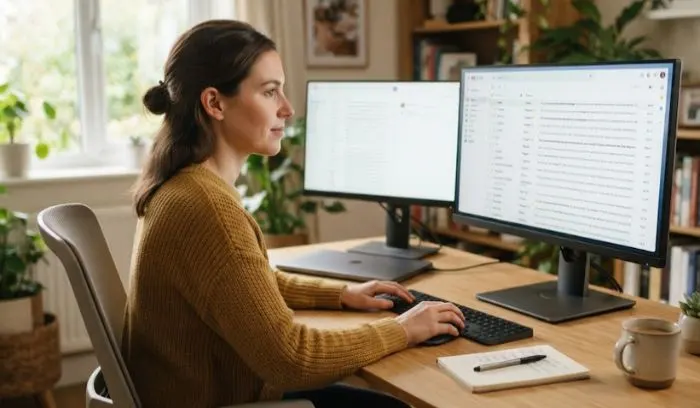
Give yourself a workstation with your desk/table, a comfy chair, and plenty of light. It might even be worth it to purchase an ergonomically correct laptop stand since your eyes are going to be on a computer screen all day and it can help with back and neck pains, also helping avoid eye strain.
Spellcheck
If you use Gmail, go to your settings, check Grammar suggestions and Spelling suggestions with Autocorrect enabled. But I always suggest not to rely only on those suggestions and to read it at least once before sending and check your Subject too.
Avoid distractions
The one drawback to telecommuting is the temptation of distraction. Someone will always knock on the door, or call your name from another room. In any case, these disturbances can impact your writing or make you unable to write at all.
Limit the times of interruption at work by taking over a spare room to work in and letting family and roommates know your 'work' hours.
You May Also Read: How can I be more productive with my planner?
Perfect your punctuation
A misplaced punctuation mark could completely alter the meaning of your sentence. Just look at the shift in intent between "Let's eat Grandma" and "Let's eat, Grandma"-all it takes is one dropped comma to make a harmless sentence of dining, even with your own grandmother, sound utterly morose. Luckily, grammar and punctuation checkers like Grammarly can prevent simple embarrassing grammatical errors like the one I just gave you.
FAQs
1. What are common writing mistakes when working from home?
Common mistakes include unclear emails, poor punctuation, spelling errors, overly short replies, unnecessary emails, and failing to proofread messages.
2. How long should a professional email be?
A professional email should be long enough to explain the purpose clearly but short enough to respect the reader's time. Around 50 to 125 words can work well for many simple business emails.
3. Why is proofreading important when working from home?
Proofreading helps catch spelling, grammar, punctuation, and typing mistakes before you send an email or message.
4. How can I avoid distractions while writing at home?
Create a dedicated workspace, set clear working hours, and let family members or roommates know when you should not be disturbed.
5. Why is punctuation important in business writing?
Punctuation can change the meaning of a sentence. Using commas, full stops, and other punctuation correctly makes your communication clearer and more professional.
you may also like



- April 07, 2026
Step-by-Step Fitness Success Plan for Men Beginners...

- March 10, 2026
How to Become an Entrepreneur With No Experience Easy...

- March 10, 2026